




Yes, robot vacuums can work without Wi-Fi. While Wi-Fi enables app control and smart features, most models can still clean effectively using built-in sensors and physical buttons.
Quick Summary
-
Most robot vacuums can handle basic cleaning without Wi-Fi.
-
Offline use usually supports core functions like starting, stopping, navigation, obstacle avoidance, and automatic docking.
-
Features such as app control, scheduling, remote access, custom mapping, and firmware updates typically require an internet connection.
-
Physical buttons or a remote control are often enough for everyday offline operation.
-
If you want stable connectivity for smart features, 2.4GHz usually offers better range than 5GHz.
In this guide, we’ll explain how robot vacuums operate offline and which features remain functional without the internet. You’ll learn what limitations to expect—like the loss of scheduling or remote control—and how to manually operate your vacuum for everyday cleaning. We also compare top models that work without Wi-Fi and explain what to consider when choosing between 2.4GHz and 5GHz networks.
Whether you're experiencing connectivity issues or prefer a simpler setup, this article will help you understand how robot vacuums perform without Wi-Fi and which models are best suited for offline use.
Do Robot Vacuums Work Without Wi-Fi?
No, robot vacuums do not need Wi-Fi to perform basic cleaning functions.
Wi-Fi is mainly used for advanced features like app control, scheduling, and customized cleaning paths. However, for simple cleaning, the robot can operate offline. You can start the vacuum using its physical button, and it will begin cleaning without any need for an internet connection.
Robot vacuums use onboard sensors, such as LiDAR or infrared, to navigate your home and avoid obstacles. This means they can clean effectively even if they’re not connected to Wi-Fi. While some models may rely on Wi-Fi for features like mapping your home or setting virtual barriers, they can still handle routine cleaning tasks without it.
In summary, Wi-Fi is useful for extra features, but it is not essential for a robot vacuum to clean your floors. Whether you’re dealing with connectivity issues or simply want a more straightforward setup, your vacuum can still get the job done.
Key Features of Robot Vacuums That Work Without Wi-Fi
Even without Wi-Fi, robot vacuums can still handle the essential cleaning tasks you expect. Although smart features like app control and mapping may be unavailable offline, the core functions such as navigation, obstacle avoidance, and cleaning remain operational.
Navigation
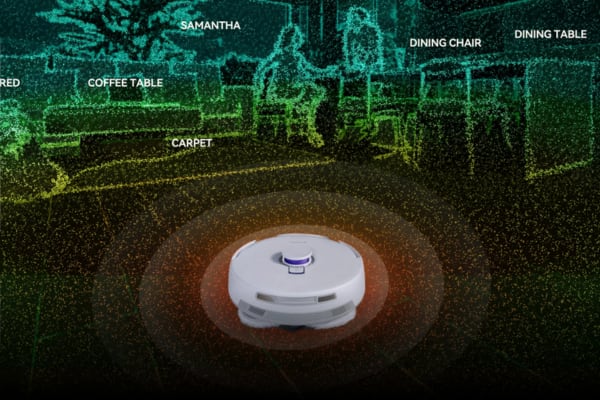
Robot vacuums rely on LiDAR sensors or visual sensors, such as cameras, for navigation. LiDAR sensors use laser beams to scan the environment, creating a 2D map of the room to help the robot understand its surroundings and follow a set cleaning path. Visual sensors use cameras to capture the layout and support navigation.
These systems allow the vacuum to move around efficiently even without Wi-Fi by relying on what it detects in the environment.
See more on our robot vacuum navigation guide.
Obstacle Avoidance
To avoid obstacles in real time, robot vacuums use infrared sensors, ultrasonic sensors, and bump sensors.
-
Infrared sensors detect objects in the robot's path by measuring distance and reflection, allowing it to slow down or turn away from walls or furniture.
-
Ultrasonic sensors emit sound waves and calculate the distance of nearby objects based on the echo, helping the vacuum avoid hitting furniture or cables.
-
Bump sensors physically detect when the vacuum hits an object, prompting it to change course.
These sensors work offline, enabling the robot to avoid obstacles without an internet connection.
Docking
When it is time to recharge, the vacuum uses infrared sensors or visual sensors to find its way back to the charging dock. Infrared sensors emit and receive signals that help the robot detect the charging station’s location, while visual sensors can recognize the dock through image processing.
The vacuum can navigate back to the dock using these sensors without needing Wi-Fi.
If your robot vacuum struggles to return to its charging dock, you can troubleshoot common causes and solutions in our robot vacuum fails to find dock guide.
Self-Emptying
Self-emptying vacuums rely on touch sensors and hardware control systems to automatically empty their dustbins. When the dustbin is full, the robot returns to the docking station, where the touch sensors trigger the self-emptying process. Dirt is then transferred into the dock’s waste container.
This process is managed through hardware and sensors, without requiring an internet connection.
If you’re unsure whether this feature is worth having, check our guide on do you really need a self-emptying robot vacuum.
Physical Controls for Basic Operations
For basic cleaning operations, robot vacuums use button sensors. These simple controls allow users to start, stop, or adjust settings like suction power directly on the device. Whether through the clean button on the robot or a remote control, these operations do not require Wi-Fi and give you direct control over basic functionality.
Cleaning Efficiency on Different Floor Types
Robot vacuums with floor detection sensors, often infrared or ultrasonic, can detect the type of surface they are cleaning. These sensors allow the vacuum to automatically adjust its cleaning mode and suction power based on whether the floor is carpet, hardwood, or tile.
For example, when on a carpet, the vacuum may increase suction, while on hardwood floors, it may reduce suction. This automatic adjustment happens offline, helping maintain effective cleaning without Wi-Fi.
What Robot Vacuum Features Won’t Work Without the Internet?
Without an internet connection, the following features will generally not be available:
-
Remote control: You won’t be able to control your vacuum remotely through the app.
-
Smart home integration: Integration with Alexa, Google Assistant, Siri, or other smart home devices that require internet access will not work.
-
Advanced cleaning mode settings: Special settings for specific cleaning modes, custom paths, or no-go zones usually cannot be adjusted without Wi-Fi.
-
Software and firmware updates: The vacuum cannot receive automatic software or firmware updates without an internet connection.
-
Scheduling through the app: Setting cleaning schedules in the app will not be possible.
-
Custom mapping: Creating and customizing maps, setting cleaning paths, or designing no-go zones typically requires an internet connection.
These features rely on internet access, but your vacuum can still perform basic cleaning tasks without it.
How to Use a Robot Vacuum Without Wi-Fi
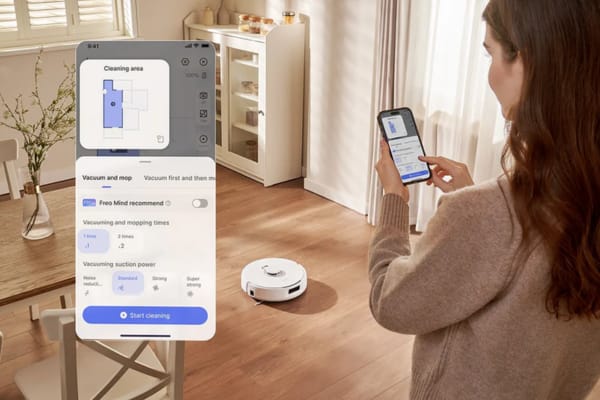
Using a robot vacuum without Wi-Fi is simple. While features like app control and scheduling may require an internet connection, you can still manage core functions such as starting a cleaning cycle, pausing, and docking entirely offline.
Step 1: Power On the Robot Vacuum
Make sure your robot vacuum is fully charged. If it is not, place it on the charging dock to recharge. Once the battery is ready, press the power button to turn it on.
Step 2: Start the Cleaning Cycle
Press the clean button on the robot to start the cleaning cycle. The vacuum will begin cleaning and moving through your space using its built-in sensors. Wi-Fi is not required for this basic cleaning function.
Step 3: Pause or Stop the Cleaning
To pause or stop the cleaning session, press the pause or stop button on the robot. This lets you manually control when cleaning starts or ends, even without an internet connection.
Step 4: Docking and Recharging
Once the vacuum finishes cleaning, or if the battery runs low, it will automatically return to its charging dock. Using onboard sensors, it can find its way back for recharging without Wi-Fi.
Step 5: Manual Maintenance
After cleaning, manually empty the dustbin if needed. You may also want to check the brushes for tangles or debris and clean them as necessary. These maintenance tasks do not require Wi-Fi and help keep the robot running smoothly.
Best Robot Vacuums Without Wi-Fi
If you're looking for a robot vacuum that performs efficiently without needing an internet connection, several models stand out for their cleaning capabilities even when offline. Models like the Narwal Freo Z10, Narwal Freo Z Ultra, and Narwal Freo Pro can help keep your home clean without relying on Wi-Fi for basic operation.
Narwal Freo Z10 Robot Vacuum & Mop
[cta:narwal-freo-z10-robot-vacuum-mop]
The Narwal Freo Z10 is a robot vacuum and mop combo that performs without Wi-Fi for everyday cleaning. Equipped with a DualFlow Tangle-Free System, this model helps prevent hair from tangling in the brushes, making it a practical choice for homes with pets. Its dynamic auto-detangling side brushes and zero-tangle floating roller brush also help reduce maintenance.
While offline, you can start, pause, and stop cleaning through the robot’s physical buttons.
Additional features:
-
Real-Time Dirt Sensing: Automatically adjusts suction and cleaning behavior based on detected dirt.
-
Self-Docking and Recharging: Returns to its charging dock automatically after cleaning.
-
Manual Cleaning Mode: Physical buttons support simple operation without Wi-Fi.
Narwal Freo Z Ultra Robot Vacuum & Mop
[cta:narwal-freo-zultra-robot-vacuum-mop]
$2,499.00
The Narwal Freo Z Ultra offers advanced AI-driven features and 12,000Pa suction power for a deep clean, even when used offline for core cleaning tasks. Its dual RGB cameras and AI navigation system help the vacuum avoid obstacles and clean efficiently. The vacuum can be manually controlled via physical buttons, and it will automatically return to its dock when done cleaning.
The self-cleaning mop helps keep it ready for the next cleaning cycle.
Additional features:
-
Dual Cameras with AI Navigation: With Wi-Fi, it uses dual cameras and AI chips to navigate obstacles and make real-time cleaning decisions, recognizing over 120 objects.
-
Smart Mapping and Cleaning Modes: With Wi-Fi, it can create detailed maps of your home and customize cleaning modes for different areas.
-
Voice Control Integration: Allows control through Alexa, Google Assistant, or Siri.
Narwal Freo Pro Robot Vacuum & Mop
The Narwal Freo Pro is a robot vacuum and mop with 8500Pa suction power and features like the DualFlow Tangle-Free System. It offers intelligent cleaning and maintenance capabilities even without Wi-Fi, while connected use can unlock additional smart features.
The Reuleaux Triangular Mop supports efficient cleaning, while EdgeSwing Technology helps clean corners and edges more effectively.
Additional features:
-
AI DirtSense Technology: With Wi-Fi, the vacuum can detect dirt and adjust its cleaning intensity, switching between suction or mopping based on real-time dirt detection.
-
Multi-Map Storage and Layered Cleaning: With Wi-Fi, it stores multiple maps for multi-level homes.
-
Automatic Mop and Dustbin Cleaning: When connected to Wi-Fi, it can automatically clean the mop and empty the dustbin at its charging station.
2.4GHz vs 5GHz: Which Wi-Fi Frequency Is Best for Your Robot Vacuum?
When setting up your robot vacuum, you may need to choose between 2.4GHz and 5GHz Wi-Fi bands. The better option depends on your home layout and how you use the vacuum’s smart features.
2.4GHz Wi-Fi
2.4GHz is the most common frequency for robot vacuums. It provides a longer range, which is useful for larger homes or layouts with multiple rooms. It also performs better through walls and obstacles.
However, 2.4GHz can be more crowded because many household devices, such as microwaves or baby monitors, also use this band. That can lead to interference or slower speeds, but for most robot vacuum connections, it usually works well.
5GHz Wi-Fi
5GHz is faster and can provide a more stable connection in the right environment. This can be useful for advanced app features such as real-time mapping or faster response in the app.
The trade-off is range. 5GHz does not travel as far as 2.4GHz and is generally better suited to smaller spaces or setups where the vacuum stays relatively close to the router. If there are multiple walls or floors between the vacuum and the router, the signal may be weaker.
Which One Should You Choose?
Here is a simple comparison:
|
Wi-Fi Frequency |
Best For |
Main Advantage |
Main Limitation |
|
2.4GHz |
Larger homes, multiple rooms, more walls |
Better range and wall penetration |
More interference from other devices |
|
5GHz |
Smaller spaces, router nearby, faster app response |
Faster speeds and potentially more stable short-range performance |
Shorter range |
If your home has many walls or multiple floors, 2.4GHz is usually the better option. If you want faster speeds and your space is smaller, 5GHz may offer better performance for smart features.
Conclusion
A robot vacuum does not need Wi-Fi to deliver basic cleaning performance. Even without internet access, many models can still handle essential functions like navigation, obstacle avoidance, cleaning, and automatic docking.
Wi-Fi mainly expands convenience through features such as app control, scheduling, smart mapping, and voice assistant integration. If those extras matter to you, choosing the right Wi-Fi band can also improve your experience.
If you're shopping in Australia, you can visit Narwal's official site for local support and information. For models that perform well offline, check out their full range of robot vacuums that work without Wi-Fi.
FAQ
Can a robot vacuum clean properly without Wi-Fi?
Yes. Most robot vacuums can still perform basic cleaning without Wi-Fi by using built-in sensors and physical controls.
What features usually stop working when a robot vacuum is offline?
App control, remote access, scheduling, custom mapping, no-go zones, smart home integration, and firmware updates usually require an internet connection.
How do you start a robot vacuum without Wi-Fi?
In most cases, you can press the power or clean button directly on the robot to start a cleaning cycle.
Is 2.4GHz or 5GHz better for robot vacuums?
2.4GHz is usually better for larger homes because it offers longer range and better wall penetration. 5GHz can be faster, but it works best at shorter distances.
Are robot vacuums with physical buttons better for offline use?
Yes. Physical buttons make offline use easier because they let you start, stop, and control basic cleaning functions without relying on an app.

