




Want to make your robot vacuum truly smart? Integrating it with your smart home system allows you to automate cleaning, control it with voice commands, and unlock advanced features that boost efficiency and convenience.
This guide walks you through every step—from setting up your robot vacuum with compatible smart devices to customizing cleaning schedules and automating routines for a hands-free experience. You’ll also learn how to control your vacuum with Alexa or Google Assistant, and how smart features like mapping, dirt detection, and adaptive suction can elevate your daily clean.
Whether you're new to smart home setups or upgrading your current one, we’ll also cover essential tips to maintain a stable connection and ensure your robot vacuum keeps working seamlessly as part of your connected ecosystem.
How to Set Up Your Robot Vacuum with Smart Devices
Connecting your robot vacuum to other smart devices in your home is key to boosting its performance. Here's how you can make it happen:
Linking Your Robot Vacuum to Your Home Wi-Fi Network
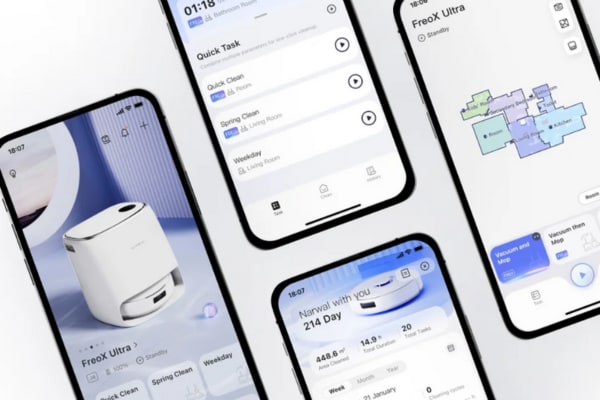
- Get the app: Download the corresponding app for your vacuum brand (e.g., Narwal).
- Pair the Vacuum: Power on the vacuum and put it into pairing mode (usually indicated by a blinking light).
-
Link to Wi-Fi: Launch the app, navigate to settings, choose your Wi-Fi, and input the password.
Verify Connection: After connecting, the app will display the vacuum’s status.
Smart Speakers and Voice Assistants: Effortless Voice Command Control
Connect your vacuum to voice assistants like Amazon Alexa or Google Assistant for effortless control.
For Amazon Alexa:
- Enable Skill: In the Alexa app, search for your vacuum's skill (e.g., "Narwal").
- Link Account: Sign in to your vacuum’s account and enable the skill.
- Voice Command: Say commands like “Alexa, start the vacuum” to control your robot vacuum.
For Google Assistant:
- Link Device: In the Google Home app, link your vacuum.
- Voice Command: Use commands like “Hey Google, start cleaning.”
Syncing with Other Smart Devices: Enhancing Efficiency
You can also sync your robot vacuum with other devices for automatic and more efficient cleaning. Smart lights can activate the vacuum as soon as you step out of the house. Similarly, door sensors can keep your vacuum from cleaning certain rooms.
To sync with smart lights:
- Use Smart Home Platform: Link your vacuum to Alexa or Google Home for easy control.
- Automate Actions: Set routines that trigger your vacuum to clean when you leave, based on lighting patterns.
Integrating your robot vacuum with smart devices helps save time and ensures your home is always clean with minimal effort.
Smart Scheduling and Automation for Cleaning Efficiency
Once connected to your smart home, you can use scheduling and automation features to optimize your robot vacuum’s cleaning process.
Scheduling Cleaning Times
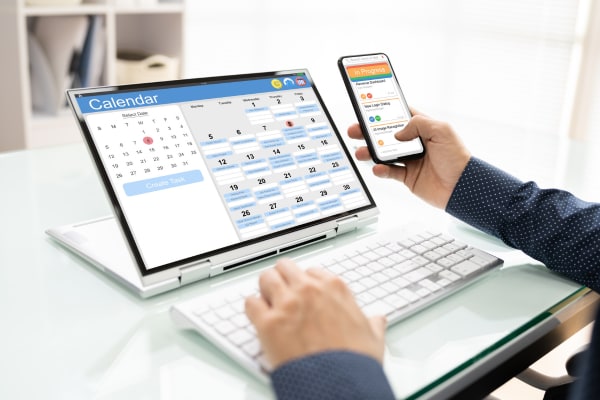
Set your vacuum to clean automatically during the times that fit your routine. Most vacuums allow you to schedule cleaning for specific days and hours.
Steps to Set a Schedule:
- Open the vacuum’s app and select the "Schedule" option.
- Set the cleaning days and times (e.g., every weekday at 9 a.m. or on weekends at 10 a.m.).
- Save the settings, and your vacuum will start cleaning on its own.
Recommended Schedule:
- Weekdays: Clean at 9:00 a.m. while you're at work.
- Weekends: Clean at 10:00 a.m. for regular maintenance.
Automating Cleaning Modes
Smart vacuums allow automatic adjustments based on the cleaning conditions. For example, if it detects a dirtier area, it will switch to a higher suction mode without you needing to intervene.
Cleaning Mode Suggestions:
- Quiet Mode: For light daily cleaning or when you’re home.
- Powerful Mode: For more thorough cleaning on carpets or high-traffic areas.
- Deep Clean Mode: For extra suction in areas with heavy dirt buildup.
By automating these modes, your robot vacuum adjusts itself for maximum efficiency.
Voice Control Your Robot Vacuum with Alexa or Google
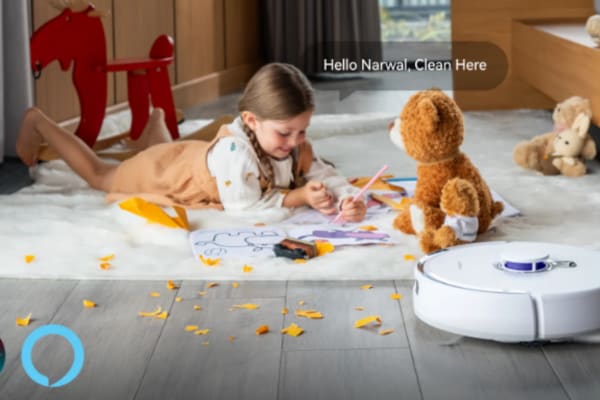
Controlling your robot vacuum with your voice is quick and simple. Just use a few commands to turn it on, pause it, or send it back to its charger—no need for buttons.
Common Voice Commands:
- Alexa Command: “Alexa, tell the robot to start cleaning the living room.”
- Google Assistant Command: “Hey Google, pause the vacuum.”
- Alexa Command: “Alexa, stop cleaning and send the vacuum back to the dock.”
- Google Assistant Command: “Hey Google, make the vacuum clean the kitchen.”
Other Useful Voice Commands:
- Start/Stop Cleaning: “Alexa, start cleaning.” / “Hey Google, stop cleaning.”
- Return to Dock: “Alexa, return to the charging station.” / “Hey Google, have the vacuum return to its charging station.”
- Set Cleaning Schedule: “Alexa, schedule cleaning for 8 a.m. every Monday.”
- Pause or Resume: “Alexa, pause cleaning.” / “Hey Google, resume cleaning.”
Voice control allows you to manage cleaning sessions while you’re cooking, working, or even when you’re not at home. It simplifies your daily tasks, allowing you to keep your home clean effortlessly without having to do any work.
Smart Features to Boost Robot Vacuum Cleaning Performance
Modern robot vacuums come with advanced features that can significantly boost their performance. These features leverage technology to make cleaning more efficient and tailored to your home’s needs.
Mapping and Learning from Your Home’s Layout
Many advanced robot vacuums use mapping technology to learn and memorize the layout of your home. Here’s how this works:
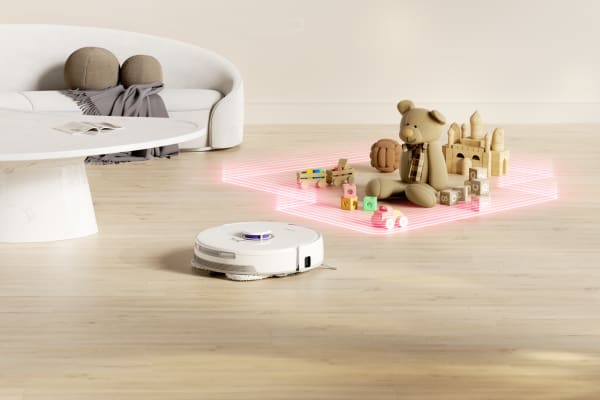
- Creating a Map of Your Home: When you first use your vacuum, it will map out your home using sensors and cameras. This process may take a few cleaning sessions as the robot explores different rooms and areas of your house. The robot generates a digital map of your space to determine the most efficient cleaning paths.
- Avoiding Obstacles: The vacuum’s mapping ability helps it recognize obstacles like furniture, walls, and even small items on the floor. Over time, the vacuum improves its cleaning routes by avoiding obstacles and efficiently covering the floor.
- Setting up Virtual Boundaries: Some high-end models let you define areas that the vacuum should avoid. These are invisible walls the vacuum cannot cross. For example, if you don’t want your robot to enter the kitchen, near delicate furniture, or into the kids' playroom, you can create these no-go zones through the app.
- Optimized Cleaning Paths: As the vacuum learns your home’s layout, it gets better at planning its cleaning paths. For example, if it notices that a particular area is frequently dirty (like the living room), it will focus more time and energy there, ensuring thorough cleaning.
How to Configure and Utilize Mapping Functions
- Step 1: Install the vacuum and connect it to your app.
- Step 2: Allow the vacuum to complete a full cleaning session to generate a map.
- Step 3: After the map is created, use the app to set no-go zones, such as around fragile furniture or in rooms you want to exclude.
- Step 4: Review and adjust the map as needed to optimize cleaning paths for the robot.
Data Analysis for Performance Optimization
Some high-end robot vacuums don’t just clean—they collect data on your home’s cleanliness and adjust their performance accordingly. Here’s how this feature enhances your vacuum’s efficiency:
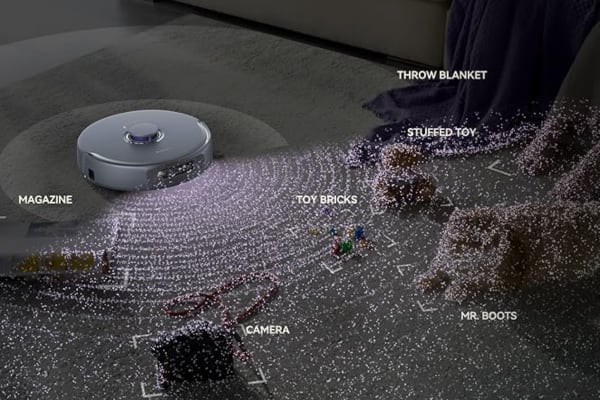
- Data Collection: The robot collects data during each cleaning session, such as how much dust, dirt, or pet hair is on the floor. It may also track areas of the home that tend to get dirtier faster, like high-traffic zones (hallways, living rooms, etc.).
- Smart Cleaning Decisions: Based on the data it collects, the vacuum will adjust its cleaning routine. For example, if it detects more dirt in a specific area, it might clean there more frequently. Conversely, it might reduce cleaning sessions in areas that remain cleaner (like guest rooms or storage areas).
- Energy Efficiency: By collecting real-time data, the vacuum can adjust its cleaning frequency to save energy. Instead of cleaning the same amount every time, it will optimize when to clean based on the data, ensuring better energy usage and battery life.
- Customizing Cleaning Schedules: Some vacuums offer settings where you can choose different cleaning frequencies for different rooms. For example, you can set the vacuum to clean the living room more often (due to pet hair or heavy traffic) while scheduling less frequent cleaning for other, less-used rooms.
How to Use Data Analytics for Optimization:
- Step 1: Connect the robot vacuum to your app and enable data tracking features.
- Step 2: Observe the data on dirt levels collected by the vacuum in different areas of your home.
- Step 3: Adjust the cleaning schedule based on these data insights. For example, increase cleaning frequency for high-traffic areas.
- Step 4: Set energy-saving modes based on data analytics to optimize the vacuum’s battery life and cleaning efficiency.
Why Connect Your Robot Vacuum to a Smart Home System?
The idea of a robot vacuum is simple: automate cleaning so you don’t have to worry about it. However, the real potential of a robot vacuum comes when it’s integrated with a smart home system. By connecting it to your smart home network, you can control it remotely, optimize its cleaning routines, and even use it to enhance the overall functionality of your home. Linking these devices boosts cleaning efficiency and ensures a deeper, more thorough clean.
Think of it this way: your robot vacuum becomes part of a team that includes your thermostat, lights, security cameras, and more. The more seamlessly these devices work together, the more efficient your home can become.
Maintaining Smart Home Connection for Robot Vacuum
Regular upkeep is key to ensuring your robot vacuum operates at peak efficiency. Here’s how to ensure it continues to work seamlessly with your smart home setup:
- Make Sure to Update the Firmware: Regularly update your vacuum's software to maintain smooth integration with your smart devices.
- Clean the Sensors and Brushes: Dirt and debris can clog up the vacuum’s sensors and brushes, affecting its performance. Frequent cleaning keeps it running at its best.
- Monitor the App for Alerts: Many robot vacuums have mobile apps that alert you if there’s an issue. Pay attention to these alerts to keep the vacuum working smoothly.
Get the Best Robot Vacuum for Your Smart Home
Bringing your robot vacuum into your smart home isn’t just about automation—it’s about reclaiming your time and letting technology handle the mess.
With smart scheduling, voice control, and AI-powered navigation, your vacuum doesn’t just follow instructions—it thinks ahead, adapts to your space, and keeps your floors spotless with zero effort from you. Imagine coming home to clean floors every day without lifting a finger.
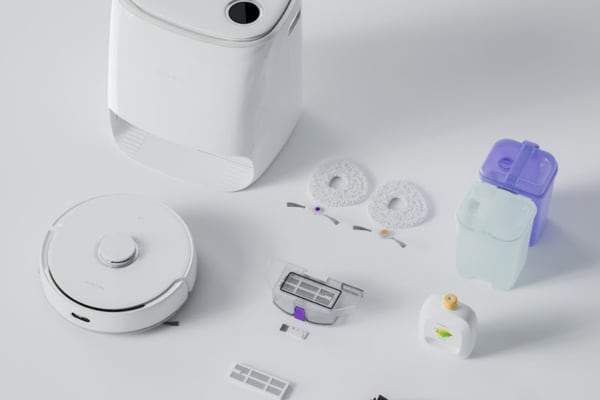
That’s exactly what Narwal Australia delivers. As Australia's top-selling robot vacuum brand, Narwal offers fully integrated models that work seamlessly with Alexa and Google, support multi-floor mapping, and come with self-emptying docks and zero-tangle technology—ideal for busy homes, pet owners, and smart home lovers alike.
Ready to make cleaning effortless? Explore our robot vacuums for smart homes and find your perfect match today. Every square inch matters—and Narwal makes sure not a single one gets left behind.